GeoSignal Preview
Upload a GDS/OAS layout, find narrow-width and narrow-gap candidates, and inspect their shapes through a simplified optical model. GeoSignal connects a layout file to locations worth a closer look in one review workflow.
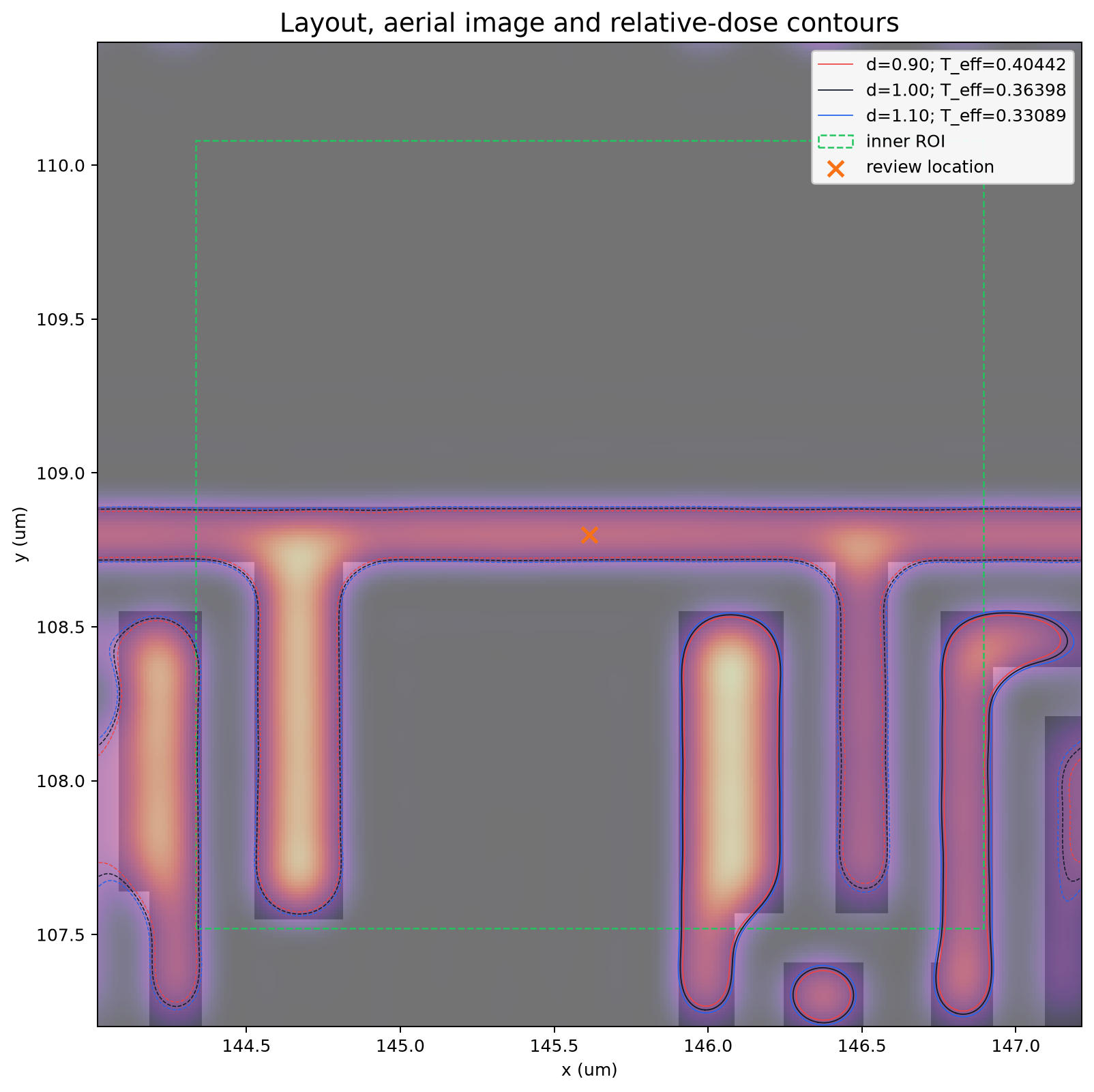
The mask is overlaid with a warm-colored aerial image and outlines. The cross marks the review location; the green dashed box marks the 2.56 × 2.56 µm review ROI. A 0.32 µm optical margin on each side makes the full displayed area 3.20 × 3.20 µm. The three outlines compare 10% less light, the baseline amount and 10% more light. Explore the results on Demo →
Explore a public layout
Find candidate locations and inspect their local shapes in the live demo.
Try Live DemoUse non-confidential files only. The free server may take time to wake up and process an analysis.
Current public preview
Width and gap checks find candidates before optical images and outlines are calculated at selected locations. A reference pattern sets the comparison baseline. Files outside the registered examples currently require a reference location, direction and design width; see the getting-started guidance on Demo.
Version-specific changes and validation results are collected in v0.10 Release Notes.
1. What is GeoSignal Preview?
GeoSignal Preview is a lightweight public demo for reviewing how layout geometry may appear from an optical-response viewpoint. It uses public GDS or synthetic layout examples to connect geometry, rasterized mask images, simplified aerial-image intensity, and threshold-contour visualization.
The basic workflow is:
layout geometry
    -> rasterized mask
    -> simplified aerial image
    -> threshold contour
    -> hotspot-like review
The goal is not precise process prediction. GeoSignal Preview focuses on one central question:
How does a pattern that looks simple from a geometry viewpoint appear from an optical-response viewpoint?
The preview is intended as a visual analysis aid, not a calibrated lithography verification tool.
2. Motivation
Geometry-based analysis, such as minimum width, minimum space, and density review, is useful for understanding layout patterns. However, geometry checks alone do not always make it easy to intuit how a pattern may behave after optical imaging.
GeoSignal Preview explores this gap by turning layout polygons into a binary mask image, generating a simplified aerial image, extracting threshold contours, and comparing geometry-based review points with optical-response behavior at the ROI level.
3. Preview Structure
GeoSignal Preview is organized around the following pages.
| Page | Description |
|---|---|
| Demo | Representative images and result interpretation |
| Method | Simplified calculation flow and interpretation logic |
| Technical Notes | Background notes for aerial image, contour, and optical interpretation |
| Release Notes | Version-level implementation changes and evaluation notes |
Demo
The Demo page presents example conditions, result summaries, width/gap candidate views and the candidate overview, with guidance on what to inspect in each image.
Method
The Method page explains the calculation concept behind the preview: candidate ROI selection, rasterized mask generation, simplified Abbe-style aerial imaging, source sampling, threshold contour extraction, and visual review.
Technical Notes
Technical Notes provide supporting background for readers who want more context on aerial images, threshold contours, source sampling, Fourier optics, and Abbe imaging.
Release Notes
Release Notes collect version-specific implementation details, benchmark notes, backend changes, and metric updates. These notes are useful for readers who want to understand how the preview evolved, but they are not required for a first reading of the demo.
4. What You Can Review in the Demo
The demo helps review questions such as:
- Does a simple-looking geometry pattern become more sensitive in optical response?
- Can edge rounding, necking, bridge-like behavior, or line-end pullback-like behavior be observed in threshold contours?
- Do geometry-based candidates and optical-response behavior point to the same locations?
- Does relative-dose comparison help reveal contour sensitivity?
The demo should be understood as a qualitative review workflow rather than a calibrated lithography prediction result.
5. Interpretation and Limitations
The results of GeoSignal Preview are intended for qualitative visualization and relative comparison.
Current assumptions and limitations are:
- public or synthetic layout examples are used
- only public, non-confidential layout files should be used with the live demo
- a simplified optical model is used
- wafer-data-based calibration is not included
- resist and etch models are not included
- relative-dose contours support model-based comparison
- results should be interpreted as qualitative indicators, not quantitative CD prediction
- core implementation code is not included in this public preview repository
6. Intended Use
GeoSignal Preview may be useful for university labs, student projects, educational researchers, or small technical teams that want to perform early learning, research, or qualitative comparison without directly relying on high-cost commercial simulation environments.
Main intended uses include:
- computational lithography study
- understanding the relationship between layout geometry and optical response
- reviewing public or synthetic pattern-based demos
- reviewing aerial-image and threshold-contour visualization
- connecting geometry checks with optical-model intuition
7. Feedback
GeoSignal Preview is currently an early public preview.
If you have feedback, questions, or suggestions, please feel free to leave a comment through the feedback form.
Share feedback through the GeoSignal Preview form
Useful feedback includes whether the demo is easy to understand, whether the contour comparison is useful, and what additional pattern examples would make the preview clearer.
8. Data and Example Policy
GeoSignal Preview is based on public datasets, synthetic patterns, and open-source layout examples.
The analysis workflow is organized around publicly shareable examples and result interpretation. Core implementation code is not included in this public preview repository.
Keywords
Lithography · Layout Analysis · GDS/OAS · Aerial Image · Threshold Contour · Hotspot Candidate · Python · Computational Lithography